Traffic Flow
| Document revision: | 1.1 (February 6, 2008, 1:40 GMT) |
| Applies to: | V3.0 |
General Information
Specifications
Packages required: systemLicense required: Level1
Submenu level: /ip traffic-flow
Hardware usage: Not significant
Related Documents
Description
MikroTik Traffic-Flow is a system that provides statistic information about packets which pass through the router. Besides network monitoring and accounting, system administrators can identify various problems that may occur in the network. With help of Traffic-Flow, it is possible to analyze and optimize the overall network performance. As Traffic-Flow is compatible with Cisco NetFlow, it can be used with various utilities which are designed for Cisco's NetFlow.
Traffic-Flow supports the following NetFlow formats:
- version 1 - the first version of NetFlow data format, do not use it, unless you have to
- version 5 - in addition to version 1, version 5 has the BGP AS and flow sequence number information included
- version 9 - a new format which can be extended with new fields and record types, thanks to its template-style design
General Configuration
Description
This section describes the basic configuration of Traffic-Flow.
Property Description
active-flow-timeout (time; default: 30m) - maximum life-time of a flowcache-entries (1k | 2k | 4k | 8k | 16k | 32k | 64k | 128k | 256k | 512k; default: 1k) - number of flows which can reside in the router's memory simultaneouslyenabled (yes | no) - whether to enable traffic-flow service or notinactive-flow-timeout (time; default: 15s) - how long to keep the flow active, if it is idleinterfaces (name) - names of those interfaces which will be used to gather statistics for traffic-flow. To specify more than one interface, separate them with a comma (",")Traffic-Flow Target
Submenu level: /ip traffic-flow targetDescription
With Traffic-Flow targets we specify those hosts which will gather the Traffic-Flow information from router.
Property Description
address (IP address:port) - IP address and UDP port of the host which receives Traffic-Flow statistics packets from the routerv9-template-refresh (integer; default: 20) - number of packets after which the template is sent to the receiving host (only for NetFlow version 9)v9-template-timeout - after how long to send the template, if it has not been sentversion (1 | 5 | 9) - which version format of NetFlow to useApplication Examples
Traffic-Flow Example
This example shows how to configure Traffic-Flow on a router
-
Enable Traffic-Flow on the router:
[admin@MikroTik] ip traffic-flow> set enabled=yes [admin@MikroTik] ip traffic-flow> print enabled: yes interfaces: all cache-entries: 1k active-flow-timeout: 30m inactive-flow-timeout: 15s [admin@MikroTik] ip traffic-flow> -
Specify IP address and port of the host, which will receive Traffic-Flow packets:
[admin@MikroTik] ip traffic-flow target> add address=192.168.0.2:2055 \
\... version=9
[admin@MikroTik] ip traffic-flow target> print
Flags: X - disabled
 #   ADDRESS               VERSION
 0   192.168.0.2:2055      9
[admin@MikroTik] ip traffic-flow target>
Now the router starts to send packets with Traffic-Flow information.
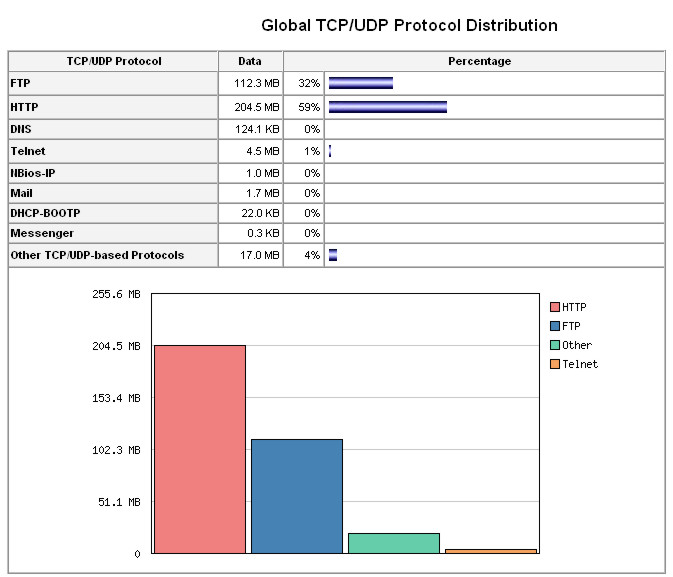
Some screenshots from NTop program, which has gathered Traffic-Flow information from our router and displays it in nice graphs and statistics. For example, where what kind of traffic has flown:
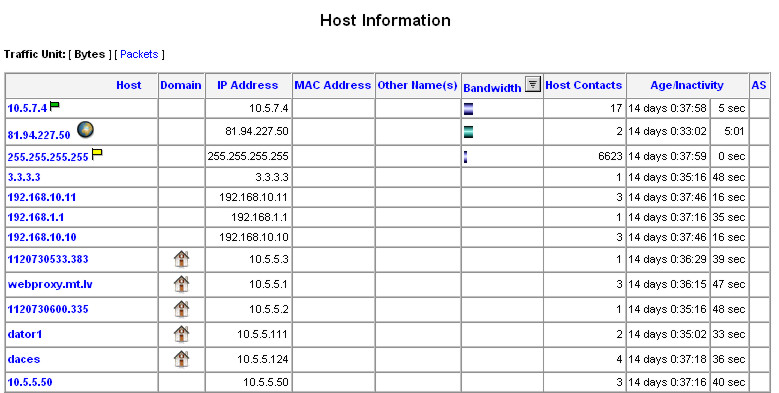
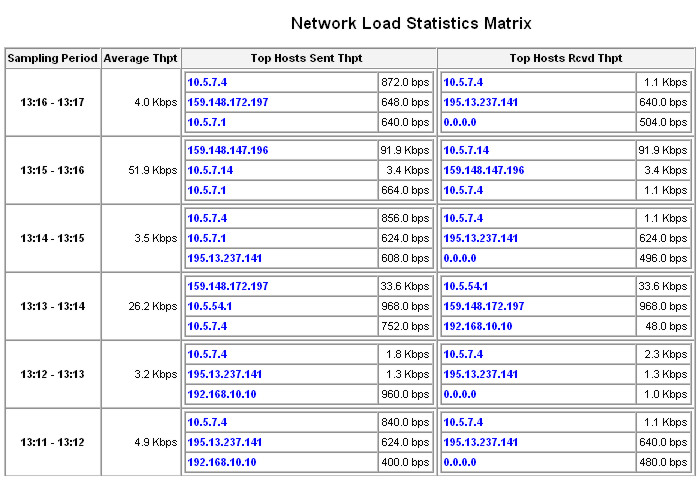
Top three hosts by upload and download each minute:
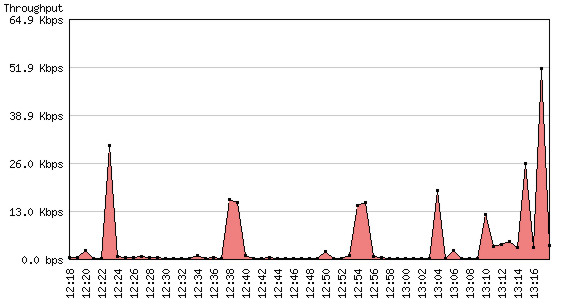
Overall network load each minute:
Traffic usage by each protocol: