For more information about the RadioLAN adapter hardware please see the relevant User’s Guides and Technical Reference Manuals.
The basic installation steps of the wireless adapter should be as follows:
[admin@MikroTik] interface radiolan> print
Flags: X - disabled, R - running
  0  R name="radiolan1" mtu=1500 mac-address=00:A0:D4:20:4B:E7 arp=enabled
       card-name="00A0D4204BE7" sid="bbbb" default-destination=first-client
       default-address=00:00:00:00:00:00 distance=0-150m max-retries=15
       tx-diversity=disabled rx-diversity=disabled


[admin@MikroTik] interface radiolan>
You can monitor the status of the wireless interface:
[admin@MikroTik] interface radiolan> monitor radiolan1
    default: 00:00:00:00:00:00
      valid: no

[admin@MikroTik] interface radiolan>
Here, the wireless interface card has not found any neighbour.
[admin@MikroTik] interface radiolan> set 0 sid ba72 distance 4.7km-6.6km
[admin@MikroTik] interface radiolan> print
Flags: X - disabled, R - running
  0  R name="radiolan1" mtu=1500 mac-address=00:A0:D4:20:4B:E7 arp=enabled
       card-name="00A0D4204BE7" sid="ba72" default-destination=first-client
       default-address=00:00:00:00:00:00 distance=4.7km-6.6km max-retries=15
       tx-diversity=disabled rx-diversity=disabled

[admin@MikroTik] interface radiolan> monitor 0
    default: 00:A0:D4:20:3B:7F
      valid: yes

[admin@MikroTik] interface radiolan>
Now we'll monitor other cards with the same sid within range:
[admin@MikroTik] interface radiolan> neighbor radiolan1 print
Flags: A - access-point, R - registered, U - registered-to-us,
D - our-default-destination
      NAME                 ADDRESS           ACCESS-POINT
    D 00A0D4203B7F         00:A0:D4:20:3B:7F
[admin@MikroTik] interface radiolan>
You can test the link by pinging the neighbour by its MAC address:
[admin@MikroTik] interface radiolan> ping 00:a0:d4:20:3b:7f radiolan1 \
\... size=1500 count=50
                 sent: 1
    successfully-sent: 1
          max-retries: 0
      average-retries: 0
          min-retries: 0

                 sent: 11
    successfully-sent: 11
          max-retries: 0
      average-retries: 0
          min-retries: 0

                 sent: 21
    successfully-sent: 21
          max-retries: 0
      average-retries: 0
          min-retries: 0

                 sent: 31
    successfully-sent: 31
          max-retries: 0
      average-retries: 0
          min-retries: 0

                 sent: 41
    successfully-sent: 41
          max-retries: 0
      average-retries: 0
          min-retries: 0

                 sent: 50
    successfully-sent: 50
          max-retries: 0
      average-retries: 0
          min-retries: 0

[admin@MikroTik] interface radiolan>
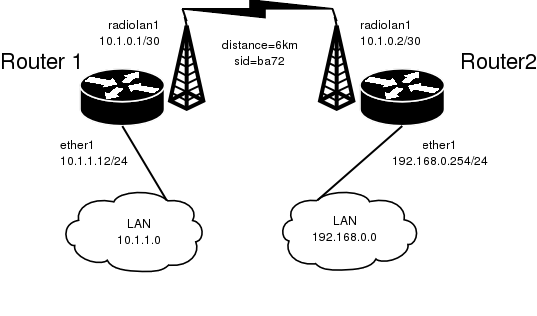
Let us consider the following network setup:
The minimum configuration required for the RadioLAN interfaces of both routers is:
The IP addresses assigned to the wireless interface of Router#1 should be from the network 10.1.0.0/30, e.g.:
[admin@MikroTik] ip address> add address=10.1.0.1/30 interface=radiolan1
[admin@MikroTik] ip address> print
Flags: X - disabled, I - invalid, D - dynamic
  #   ADDRESS            NETWORK         BROADCAST       INTERFACE
  0   10.1.1.12/24       10.1.1.0        10.1.1.255      ether1
  1   10.1.0.1/30        10.1.0.0        10.1.0.3        radiolan1
[admin@MikroTik] ip address>
The default route should be set to the gateway router 10.1.1.254. A static route should be added for the network 192.168.0.0/24:
[admin@MikroTik] ip route> add gateway=10.1.1.254
comment  copy-from  disabled  distance  dst-address  netmask  preferred-source
[admin@MikroTik] ip route> add gateway=10.1.1.254 preferred-source=10.1.0.1
[admin@MikroTik] ip route> add dst-address=192.168.0.0/24 gateway=10.1.0.2 \
\... preferred-source=10.1.0.1
[admin@MikroTik] ip route> print
Flags: X - disabled, I - invalid, D - dynamic, J - rejected,
C - connect, S - static, R - rip, O - ospf, B - bgp
    #    DST-ADDRESS        G GATEWAY         DISTANCE INTERFACE
    0  S 0.0.0.0/0          u 10.1.1.254      1        radiolan1
    1  S 192.168.0.0/24     r 10.1.0.2        1        radiolan1
    2 DC 10.1.0.0/30        r 0.0.0.0         0        radiolan1
    3 DC 10.1.1.0/24        r 0.0.0.0         0        ether1
[admin@MikroTik] ip route>
The Router#2 should have addresses 10.1.0.2/30 and 192.168.0.254/24 assigned to the radiolan and Ethernet interfaces respectively. The default route should be set to 10.1.0.1