uptime (time) - connection time displayed in days, hours, minutes, and seconds
encoding (string) - encryption and encoding (if asymmetric, separated with '/') being used in this connection
service-name (string) - name of the serice the client is connected to
ac-name (string) - name of the AC the client is connected to
ac-mac (MAC address) - MAC address of the AC the client is connected to
Example
To monitor the pppoe-out1 connection:
[admin@MikroTik] interface pppoe-client> monitor pppoe-out1
          status: "connected"
          uptime: 10s
        encoding: "none"
    service-name: "testSN"
         ac-name: "10.0.0.1"
          ac-mac: 00:C0:DF:07:5E:E6

[admin@MikroTik] interface pppoe-client>
PPPoE Server Setup (Access Concentrator)
Submenu level : /interface pppoe-server serverDescription
The PPPoE server (access concentrator) supports multiple servers for each interface with differing service names. Currently the throughput of the PPPoE server has been tested to 160Mb/s on a Celeron 600 CPU. Using higher speed CPUs should increase the throughput proportionately.The access concentrator name and PPPoE service name are used by clients to identify the access concentrator to register with. The access concentrator name is the same as the identity of the router displayed before the command prompt. The identity may be set within the /system identity submenu.
Property Description
service-name (string) - the PPPoE service namemtu (integer; default: 1480) - Maximum Transmit Unit. The optimal value is the MTU of the interface the tunnel is working over decreased by 20 (so, for 1500-byte ethernet link, set the MTU to 1480 to avoid fragmentation of packets)
mru (integer; default: 1480) - Maximum Receive Unit. The optimal value is the MTU of the interface the tunnel is working over decreased by 20 (so, for 1500-byte ethernet link, set the MTU to 1480 to avoid fragmentation of packets)
authentication (multiple choice: pap | chap | mschap1 | mschap2; default: mschap2, mschap, chap, pap) - authentication algorithm
keepalive-timeout - defines the time period (in seconds) after which the router is starting to send keepalive packets every second. If no traffic and no keepalive responses has came for that period of time (i.e. 2 * keepalive-timeout), not responding client is proclaimed disconnected
one-session-per-host (yes | no; default: no) - allow only one session per host (determined by MAC address). If a host will try to establish a new session, the old one will be closed
default-profile (name; default: default) - default profile to use
Notes
The default keepalive-timeout value of 10 is OK in most cases. If you set it to 0, the router will not disconnect clients until they log out or router is restarted. To resolve this problem, the one-session-per-host property can be used.Security issue: do not assign an IP address to the interface you will be receiving the PPPoE requests on.
And also note that if service name is not specified in Windows XP, it will use only service with no name. So if you want to serve Windows XP clients, leave your service-name empty.
Example
To add PPPoE server on ether1 interface providing ex service and allowing only one connection per host:
[admin@MikroTik] interface pppoe-server server> add interface=ether1 \
\... service-name=ex one-session-per-host=yes
[admin@MikroTik] interface pppoe-server server> print
Flags: X - disabled
  0 X service-name="ex" interface=ether1 mtu=1480 mru=1480
      authentication=mschap2,mschap,chap,pap keepalive-timeout=10
      one-session-per-host=yes default-profile=default

[admin@MikroTik] interface pppoe-server server>
PPPoE Server Users
Submenu level : /interface pppoe-serverProperty Description
Statistics:
name (name) - interface name
service-name (name) - name of the service the user is connected to
remote-address (MAC address) - MAC address of the connected client
user (name) - the name of the connected user
encoding (string) - encryption and encoding (if asymmetric,
separated with '/') being used in this connection
uptime - shows how long the client is connected
Example
To view the currently connected users:[admin@MikroTik] interface pppoe-server> print Flags: R - running # NAME SERVICE REMOTE-ADDRESS USER ENCO... UPTIME 0 R <pppoe-ex> ex 00:C0:CA:16:16:A5 ex 12s [admin@MikroTik] interface pppoe-server>To disconnect the user ex:
[admin@MikroTik] interface pppoe-server> remove [find user=ex]
[admin@MikroTik] interface pppoe-server> print

[admin@MikroTik] interface pppoe-server>
PPPoE Troubleshooting
- The PPPoE server shows more than one active user entry for one client,
when the clients disconnect, they are still shown and active
Set the keepalive-timeout parameter (in the PPPoE server configuration) to 10 if You want clients to be considered logged off if they do not respond for 10 seconds.
Note that if the keepalive-timeout parameter is set to 0 and the only-one parameter (in PPP profile settings) is set to yes then the clients might be able to connect only once. To resolve this problem one-session-per-host parameter in PPPoE server configuration should be set to yes - I can get through the PPPoE link only small packets (eg. pings)
You need to change MSS of all the packets passing through the PPPoE link to the value of PPPoE link's MTU-40 at least on one of the peers. So for PPPoE link with MTU of 1480:[admin@MikroTik] ip firewall mangle> add protocol=tcp tcp-options=syn-only \ \.. action=passthrough tcp-mss=1440 [admin@MikroTik] ip firewall mangle> print Flags: X - disabled, I - invalid 0 src-address=0.0.0.0/0:0-65535 in-interface=all dst-address=0.0.0.0/0:0-65535 protocol=tcp tcp-options=syn-only icmp-options=any:any flow="" src-mac-address=00:00:00:00:00:00 limit-count=0 limit-burst=0 limit-time=0s action=passthrough mark-flow="" tcp-mss=1440 [admin@MikroTik] ip firewall mangle> - My windows PPPoE client obtains IP address and default gateway
from the MikroTik PPPoE server, but it cannot ping beyond the PPPoE server and use the Internet.
PPPoE server is not bridging the clients. Configure masquerading for the PPPoE client addresses, or make sure you have proper routing for the address space used by the clients, or you enable Proxy-ARP on the Ethernet interface (See the IP Addresses and Address Resolution Protocol (ARP) Manual). - My Windows XP client cannot connect to the PPPoE server.
You have to specify the "Service Name" in the properties of the XP PPPoE client. If the service name is not set, or it does not match the service name of the MikroTik PPPoE server, you get the "line is busy" errors, or the system shows "verifying password - unknown error". - I want to have logs for PPPoE connection establishment
Configure the logging feature under the /system logging facility and enable the PPP type logs.
Application Examples
PPPoE in a multipoint wireless 802.11 network
In a wireless network, the PPPoE server may be attached to an Access Point (as well as to a regular station of wireless infrastructure). Either our RouterOS client or Windows PPPoE clients may connect to the Access Point for PPPoE authentication. Further, for RouterOS clients, the radio interface may be set to MTU 1600 so that the PPPoE interface may be set to MTU 1500. This optimizes the transmission of 1500 byte packets and avoids any problems associated with MTUs lower than 1500. It has not been determined how to change the MTU of the Windows wireless interface at this moment.
Let us consider the following setup where the MikroTik Wireless AP offers wireless clients transparent access to the local network with authentication:
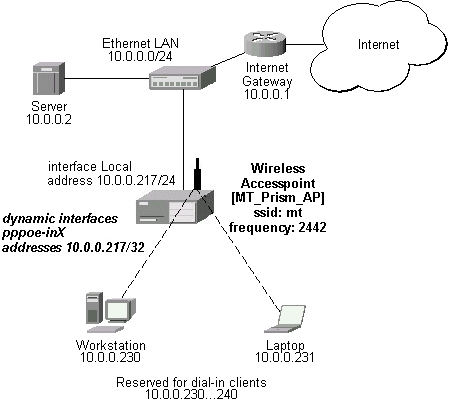
Note that you should have Basic + Wireless + Wireless AP licenses for this setup.
First of all, the Prism interface should be configured:
[admin@MT_Prism_AP] interface prism> set 0 mode=ap-bridge frequency=2442MHz \
\... ssid=mt disabled=no
[admin@MT_Prism_AP] interface prism> print
Flags: X - disabled, R - running
  0  R name="prism1" mtu=1500 mac-address=00:90:4B:02:17:E2 arp=enabled
       mode=ap-bridge root-ap=00:00:00:00:00:00 frequency=2442MHz ssid="mt"
       default-authentication=yes default-forwarding=yes max-clients=2007
       card-type=generic tx-power=auto supported-rates=1-11 basic-rates=1
       hide-ssid=no

[admin@MT_Prism_AP] interface prism> /ip address
Now, the Ethernet interface and IP address are to be set:
[admin@MT_Prism_AP] ip address> add address=10.0.0.217/24 interface=Local
[admin@MT_Prism_AP] ip address> print
Flags: X - disabled, I - invalid, D - dynamic
  #   ADDRESS            NETWORK         BROADCAST       INTERFACE
  0   10.0.0.217/24      10.0.0.0        10.0.0.255      Local

[admin@MT_Prism_AP] ip address> /ip route
[admin@MT_Prism_AP] ip route> add gateway=10.0.0.1
[admin@MT_Prism_AP] ip route> print
Flags: X - disabled, I - invalid, D - dynamic, J - rejected,
C - connect, S - static, R - rip, O - ospf, B - bgp
    #    DST-ADDRESS        G GATEWAY         DISTANCE INTERFACE
    0  S 0.0.0.0/0          r 10.0.0.1        1        Local
    1 DC 10.0.0.0/24        r 0.0.0.0         0        Local

[admin@MT_Prism_AP] ip route> /interface ethernet
[admin@MT_Prism_AP] interface ethernet> set Local arp=proxy-arp
[admin@MT_Prism_AP] interface ethernet> print
Flags: X - disabled, R - running
  #    NAME                 MTU   MAC-ADDRESS       ARP
  0  R Local                1500  00:50:08:00:00:F5 proxy-arp

[admin@MT_Prism_AP] interface ethernet>
We should add PPPoE server to the Prism interface:
[admin@MT_Prism_AP] interface pppoe-server server> add interface=prism1 \
\... service-name=mt one-session-per-host=yes disabled=no
[admin@MT_Prism_AP] interface pppoe-server server> print
Flags: X - disabled
  0   service-name="mt" interface=prism1 mtu=1480 mru=1480
      authentication=mschap2,mschap,chap,pap keepalive-timeout=10
      one-session-per-host=yes default-profile=default

[admin@MT_Prism_AP] interface pppoe-server server>
MSS should be changed for the packets flowing through the PPPoE link:
[admin@MT_Prism_AP] ip firewall mangle> add protocol=tcp tcp-options=syn-only \
\.. action=passthrough tcp-mss=1440
[admin@MT_Prism_AP] ip firewall mangle> print
Flags: X - disabled, I - invalid
  0   src-address=0.0.0.0/0:0-65535 in-interface=all
      dst-address=0.0.0.0/0:0-65535 protocol=tcp tcp-options=syn-only
      icmp-options=any:any flow="" src-mac-address=00:00:00:00:00:00
      limit-count=0 limit-burst=0 limit-time=0s action=passthrough
      mark-flow="" tcp-mss=1440

[admin@MT_Prism_AP] ip firewall mangle>
And finally, we can set up PPPoE clients:
[admin@MT_Prism_AP] ip pool> add name=pppoe ranges=10.0.0.230-10.0.0.240
[admin@MT_Prism_AP] ip pool> print
  # NAME                                        RANGES
  0 pppoe                                       10.0.0.230-10.0.0.240

[admin@MT_Prism_AP] ip pool> /ppp profile
[admin@MT_Prism_AP] ppp profile> set default use-encryption=yes \
\... local-address=10.0.0.217 remote-address=pppoe
[admin@MT_Prism_AP] ppp profile> print
Flags: * - default
  0 * name="default" local-address=10.0.0.217 remote-address=pppoe
      session-timeout=0s idle-timeout=0s use-compression=no
      use-vj-compression=no use-encryption=yes require-encryption=no
      only-one=no tx-bit-rate=0 rx-bit-rate=0 incoming-filter=""
      outgoing-filter=""

[admin@MT_Prism_AP] ppp profile> .. secret
[admin@MT_Prism_AP] ppp secret> add name=w password=wkst service=pppoe
[admin@MT_Prism_AP] ppp secret> add name=l password=ltp service=pppoe
[admin@MT_Prism_AP] ppp secret> print
Flags: X - disabled
  #   NAME              SERVICE CALLER-ID       PASSWORD        PROFILE
  0   w                 pppoe                   wkst            default
  1   l                 pppoe                   ltp             default
[admin@MT_Prism_AP] ppp secret> print
Thus we have completed the configuration and added two users: w and l
who are able to connect using PPPoE client software.
Note that Windows XP built-in client supports encryption, but RASPPPOE does not. So, if it is planned not to support Windows clients older than Windows XP, it is recommended to switch require-encryption to yes value in the default profile configuration. In other case, the server will accept clients that do not encrypt data.
Additional Resources
Links for PPPoE documentation:
- http://www.ietf.org/rfc/rfc2516.txt
- http://www.cisco.com/univercd/cc/td/doc/product/software/ios120/120newft/120limit/120dc/120dc3/pppoe.htm
- http://www.carricksolutions.com
PPPoE Clients:
- RASPPPoE for Windows 95, 98, 98SE, ME, NT4, 2000, XP, .NET http://user.cs.tu-berlin.de/~normanb/
© Copyright 1999-2003, MikroTik