[admin@MikroTik] ip address> add interface=pvc1 address=1.1.1.1 netmask=255.255.255.0
[admin@MikroTik] ip address> print
Flags: X - disabled, I - invalid, D - dynamic
  #   ADDRESS            NETWORK         BROADCAST       INTERFACE
  0   1.1.1.1/24         1.1.1.0         1.1.1.255       pvc1
[admin@MikroTik] ip address>
PVC and Cyclades interface configuration
[admin@MikroTik] interface cyclades> print
Flags: X - disabled, R - running
  0  R name="cyclades1" mtu=1500 line-protocol=frame-relay media-type=V35
       clock-rate=64000 clock-source=external line-code=B8ZS framing-mode=ESF
       line-build-out=0dB rx-sensitivity=short-haul frame-relay-lmi-type=ansi
       frame-relay-dce=no chdlc-keepalive=10s

[admin@MikroTik] interface cyclades>
[admin@MikroTik] interface pvc> print
Flags: X - disabled, R - running
  #    NAME                 MTU  DLCI INTERFACE
  0  R pvc1                 1500 42   cyclades1
[admin@MikroTik] interface pvc>
CISCO# show running-config
Building configuration...
Current configuration...
...
!
ip subnet-zero
no ip domain-lookup
frame-relay switching
!
interface Ethernet0
 description connected to EthernetLAN
 ip address 10.0.0.254 255.255.255.0
!
interface Serial0
 description connected to Internet
 no ip address
 encapsulation frame-relay IETF
 serial restart-delay 1
 frame-relay lmi-type ansi
 frame-relay intf-type dce
!
interface Serial0.1 point-to-point
 ip address 1.1.1.2 255.255.255.0
 no arp frame-relay
 frame-relay interface-dlci 42
!
...
end.
Send ping to MikroTik router
CISCO#ping 1.1.1.1

Type escape sequence to abort.
Sending 5, 100-byte ICMP Echos to 1.1.1.1, timeout is 2 seconds:
!!!!!
Success rate is 100 percent (5/5), round-trip min/avg/max = 28/31/32 ms
CISCO#
[admin@MikroTik] ip address> add interface=pvc1 address=1.1.1.1 netmask=255.255.255.0
[admin@MikroTik] ip address> print
Flags: X - disabled, I - invalid, D - dynamic
  #   ADDRESS            NETWORK         BROADCAST       INTERFACE
  0   1.1.1.1/24         1.1.1.0         1.1.1.255       pvc1
[admin@MikroTik] ip address>
PVC and Moxa interface configuration
[admin@MikroTik] interface moxa-c502> print
Flags: X - disabled, R - running
  0  R name="moxa1" mtu=1500 line-protocol=frame-relay clock-rate=64000
       clock-source=external frame-relay-lmi-type=ansi frame-relay-dce=no
       cisco-hdlc-keepalive-interval=10s

  1 X  name="moxa-c502-2" mtu=1500 line-protocol=sync-ppp clock-rate=64000
       clock-source=external frame-relay-lmi-type=ansi frame-relay-dce=no
       cisco-hdlc-keepalive-interval=10s

[admin@MikroTik] interface moxa-c502>
[admin@MikroTik] interface pvc> print
Flags: X - disabled, R - running
  #    NAME                 MTU  DLCI INTERFACE
  0  R pvc1                 1500 42   moxa1
[admin@MikroTik] interface pvc>
CISCO router setup
CISCO# show running-config
Building configuration...
Current configuration...
...
!
ip subnet-zero
no ip domain-lookup
frame-relay switching
!
interface Ethernet0
 description connected to EthernetLAN
 ip address 10.0.0.254 255.255.255.0
!
interface Serial0
 description connected to Internet
 no ip address
 encapsulation frame-relay IETF
 serial restart-delay 1
 frame-relay lmi-type ansi
 frame-relay intf-type dce
!
interface Serial0.1 point-to-point
 ip address 1.1.1.2 255.255.255.0
 no arp frame-relay
 frame-relay interface-dlci 42
!
...
end.
Send ping to MikroTik router
CISCO#ping 1.1.1.1

Type escape sequence to abort.
Sending 5, 100-byte ICMP Echos to 1.1.1.1, timeout is 2 seconds:
!!!!!
Success rate is 100 percent (5/5), round-trip min/avg/max = 28/31/32 ms
CISCO#
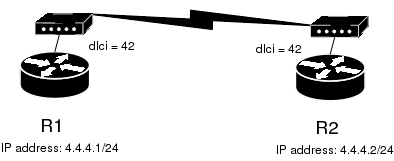
Let us consider the following example:
In this example we will use two Moxa C101 syncronous cards.
Do not forget to set line-protocol for synchronous interfaces to frame-relay. To achieve proper result, one of the synchronous interfaces must operate in DCE mode:
[admin@r1] interface moxa-c101> set 0 frame-relay-dce=yes
[admin@r1] interface moxa-c101> print
Flags: X - disabled, R - running
  0  R name="moxa-c101-1" mtu=1500 line-protocol=frame-relay clock-rate=64000
       clock-source=external frame-relay-lmi-type=ansi frame-relay-dce=yes
       cisco-hdlc-keepalive-interval=10s ignore-dcd=no

[admin@r1] interface moxa-c101>
Then we need to add PVC interfaces and IP addresses.
on the R1:
[admin@r1] interface pvc> add dlci=42 interface=moxa-c101-1
[admin@r1] interface pvc> print
Flags: X - disabled, R - running
  #    NAME                                               MTU  DLCI INTERFACE
  0 X  pvc1                                               1500 42   moxa-c101-1

[admin@r1] interface pvc> /ip address add address 4.4.4.1/24 interface pvc1
on the R2:
[admin@r2] interface pvc> add dlci=42 interface=moxa-c101-1
[admin@r2] interface pvc> print
Flags: X - disabled, R - running
  #    NAME                                               MTU  DLCI INTERFACE
  0 X  pvc1                                               1500 42   moxa-c101-1

[admin@r2] interface pvc> /ip address add address 4.4.4.2/24 interface pvc1
Finally we must enable PVC interfaces:
[admin@r1] interface pvc> enable pvc1
[admin@r1] interface pvc>
[admin@r2] interface pvc> enable pvc1
[admin@r2] interface pvc>