For more information about the CISCO/Aironet PCI/ISA adapter hardware please see the relevant
User’s Guides and Technical Reference Manuals in .pdf format:
Documentation about CISCO/Aironet Wireless Bridges and Access Points can be found in archives:
To use CISCO/Aironet PCMCIA cards, first check Notes on PCMCIA Adapters
[admin@MikroTik] > /system package pr
Flags: I - invalid
  #   NAME                  VERSION              BUILD-TIME           UNINSTALL
  0   system                2.6beta3             jul/31/2002 14:05:02 no
  1   ppp                   2.6beta3             jul/31/2002 14:05:25 no
  2   pppoe                 2.6beta3             jul/31/2002 14:05:42 no
  3   pptp                  2.6beta3             jul/31/2002 14:05:39 no
  4   aironet               2.6beta3             jul/31/2002 14:05:45 no
[admin@MikroTik] >
[admin@MikroTik] > system resource irq print
Flags: U - unused
   IRQ OWNER
   1   keyboard
   2   APIC
 U 3
   4   sync1
 U 5
 U 6
 U 7
 U 8
 U 9
 U 10
   11  ether1
 U 12
   13  FPU
   14  IDE 1
[admin@MikroTik] > system resource io print
 PORT-RANGE        OWNER
 20-3F             APIC
 40-5F             timer
 60-6F             keyboard
 80-8F             DMA
 A0-BF             APIC
 C0-DF             DMA
 F0-FF             FPU
 1F0-1F7           IDE 1
 3C0-3DF           VGA
 3F6-3F6           IDE 1
 CF8-CFF           [PCI conf1]
 1000-100F         [Silicon Integrated Systems [SiS] 5513 [IDE]]
 1000-1007         IDE 1
 1008-100F         IDE 2
 6000-60FF         [Realtek Semiconductor Co., Ltd. RTL-8139]
 6000-60FF         [8139too]
 6100-61FF         [Realtek Semiconductor Co., Ltd. RTL-8139 (#2)]
 6100-61FF         [8139too]
[admin@MikroTik] >
The basic installation steps of the wireless adapter should be as follows:
The ISA card requires the driver to be loaded by issuing the following command:
[admin@MikroTik]> driver add name=pc-isa io=0x180
[admin@MikroTik]> driver print
Flags: I - invalid, D - dynamic
  #   DRIVER                            IRQ IO         MEMORY     ISDN-PROTOCOL
  0 D PCI NE2000
  1   Aironet ISAxx00                       0x180
[admin@MikroTik] driver>
There can be several reasons for a failure to load the driver:
[admin@MikroTik] > interface print
Flags: X - disabled, D - dynamic, R - running
  #    NAME                 TYPE             MTU
  0  R ether1               ether            1500
  1 X  ether2               ether            1500
  2 X  pc1                  pc               1500
[admin@MikroTik] interface> set 1 name aironet
[admin@MikroTik] interface> enable aironet
[admin@MikroTik] > interface print
Flags: X - disabled, D - dynamic, R - running
  #    NAME                 TYPE             MTU
  0  R ether1               ether            1500
  1 X  ether2               ether            1500
  2  R aironet              pc               1500
[admin@MikroTik] >
More configuration and statistics parameters can be found under the /interface pc menu:
[admin@MikroTik] interface pc> pr
Flags: X - disabled, R - running
  0  R name="pc1" mtu=1500 mac-address=00:40:96:29:2F:80 arp=enabled
       client-name="" ssid1="tsunami" ssid2="" ssid3="" mode=infrastructure
       data-rate=1Mbit/s frequency=2437MHz modulation=cck tx-power=100
       ap1=00:00:00:00:00:00 ap2=00:00:00:00:00:00 ap3=00:00:00:00:00:00
       ap4=00:00:00:00:00:00 rx-antenna=right tx-antenna=right beacon-period=100
       long-retry-limit=16 short-retry-limit=16 rts-threshold=2312
       fragmentation-threshold=2312 join-net=10s card-type=PC4800A 3.65

[admin@MikroTik] interface pc>
Argument description:
number - Interface number in the list
name - Interface name
mtu - Maximum Transmit Unit (256...2048 bytes). Default value is 1500 bytes.
mode - Operation mode of the card (infrastructure / ad-hoc)
rts-threshold - RTS threshold
fragmentation-threshold - Fragmentation threshold
tx-power - Transmit power in mW
rx-antenna - Receive antenna (both, default, left, right)
tx-antenna - Transmit antenna (both, default, left, right)
long-retry-limit - Long retry limit
short-retry-limit - Short retry limit
frequency - Channel frequency (2412MHz, 2422MHz ... 2484MHz)
bitrate - Data rate (11Mbit/s, 1Mbit/s, 2Mbit/s, 5.5Mbit/s, auto)
ap1 - Access Point 1
ap2 - Access Point 2
ap3 - Access Point 3
ap4 - Access Point 4
ssid1 - Service Set Identifier 1
ssid2 - Service Set Identifier 2
ssid3 - Service Set Identifier 3
modulation - Modulation mode (cck, default, mbok)
client-name - Client name
join-net - Beaconing period
arp - Address Resolution Protocol, one of the:
- disabled - the interface will not use ARP protocol
- enabled - the interface will use ARP protocol
- proxy-arp - the interface will be an ARP proxy (see corresponding manual)
- reply-only - the interface will only reply to the requests originated to its own IP addresses, but neighbour MAC addresses will be gathered from /ip arp statically set table only.
You can monitor the status of the wireless interface:
[admin@MikroTik] interface pc> monitor 0
         synchronized: no
           associated: no
         error-number: 0

[admin@MikroTik] interface pc>
If the wireless interface card is not registered to an AP, the green status led is blinking fast.
To set the wireless interface for working with an IEEE 802.11b access point (register to the AP), you should set the following parameters:
[admin@MikroTik] interface pc> set 0 ssid1 mt
[admin@MikroTik] interface pc> monitor 0
         synchronized: yes
           associated: yes
            frequency: 2412MHz
            data-rate: 11Mbit/s
                 ssid: "mt"
         access-point: 00:02:6F:01:5D:FE
    access-point-name: ""
       signal-quality: 132
      signal-strength: -82
         error-number: 0

[admin@MikroTik] interface pc>
If the wireless interface card is registered to an AP, the green status led is blinking slow.
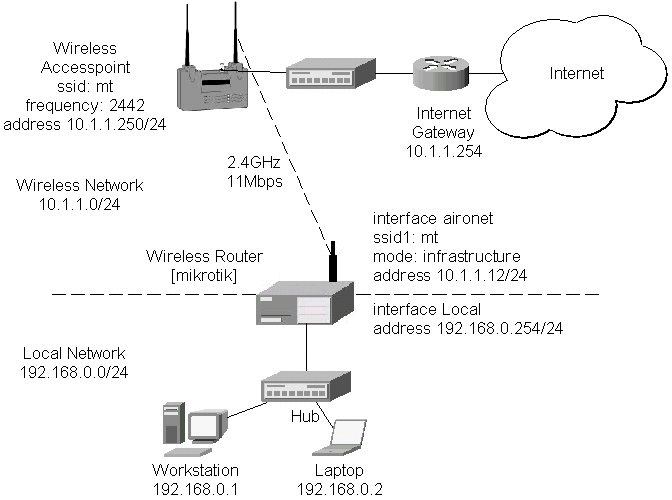
Two possible wireless network configurations are discussed in the following examples:
The access point is connected to the wired network's HUB and has IP address from the network 10.1.1.0/24. The minimum configuration required for the AP is:
Reminder! Please note, that the AP is not a router! It has just one network address, and is just like any host on the network. It resembles a wireless-to-Ethernet HUB or bridge. The AP does not route the IP traffic! There is no need to set up the routing table under Configuration/Ident/Routing.
The frequency argument does not have any meaning, since the frequency of the AP is used. The IP addresses assigned to the wireless interface should be from the network 10.1.1.0/24, e.g.:
[admin@MikroTik] ip address> add address 10.1.1.12/24 interface aironet
[admin@MikroTik] ip address> print
Flags: X - disabled, I - invalid, D - dynamic
  #   ADDRESS            NETWORK         BROADCAST       INTERFACE
  0   10.1.1.12/24       10.1.1.0        10.1.1.255      aironet
  1   192.168.0.254/24   192.168.0.0     192.168.0.255   Local
[admin@MikroTik] ip address>
The default route should be set to the gateway router 10.1.1.254 (not the AP 10.1.1.250 !):
[admin@MikroTik] ip route> add gateway=10.1.1.254
[admin@MikroTik] ip route> print
Flags: X - disabled, I - invalid, D - dynamic, J - rejected,
C - connect, S - static, R - rip, O - ospf, B - bgp
    #    DST-ADDRESS        G GATEWAY         DISTANCE INTERFACE
    0  S 0.0.0.0/0          r 10.1.1.254      1        aironet
    1 DC 192.168.0.0/24     r 0.0.0.0         0        Local
    2 DC 10.1.1.0/24        r 0.0.0.0         0        aironet
[admin@MikroTik] ip route>
Let us consider the following point-to-point wireless network setup with two MikroTik Wireless Routers:
To establish a point-to-point link, the configuration of the wireless interface should be as follows:
For 10 seconds (this is set by the argument join-net) the wireless card is looking for a network to join.
The status of the card is not synchronized, and the green status light is blinking fast.
If the card cannot find a network, the card creates its own network.
The status of the card becomes synchronized, and the green status led becomes solid.
The monitor command shows the new status and the MAC address generated:
The other router of the point-to-point link requires
the operation mode set to ad-hoc, the System Service Identificator set to "b_link",
and the channel frequency set to 2412MHz.
If the radios are able to establish RF connection, the status of the card should become synchronized,
and the green status led become solid immediately after entering the command:
As we see, the MAC address under the access-point parameter is the same as generated on the first router.
If desired, IP addresses can be assigned to the wireless interfaces of the pint-to-point link routers
using a smaller subnet, say 30-bit one:
The second router will have address 192.168.11.2.
The network connectivity can be tested by using ping or bandwidth test:
Point-to-Point Wireless LAN
Point-to-point connections using two wireless clients require the wireless
cards to operate in ad-hoc mode. This mode does not provide the required
timing for the cases of long distance (over 20km) links. Thus,
the performance of such links is very poor on long distances, and
use of infrastructure mode is required, where a wireless client registers to an
access point or bridge.

The following command should be issued to change the settings for the pc interface
of the master unit:
[admin@MikroTik] interface pc> set 0 mode ad-hoc ssid1 b_link frequency 2442MHz \
\... bitrate auto
[admin@MikroTik] interface pc>
[admin@MikroTik] interface pc> mo 0
         synchronized: yes
           associated: yes
            frequency: 2442MHz
            data-rate: 11Mbit/s
                 ssid: "b_link"
         access-point: 2E:00:B8:01:98:01
    access-point-name: ""
       signal-quality: 35
      signal-strength: -62
         error-number: 0

[admin@MikroTik] interface pc>
[admin@wnet_gw] interface pc> set 0 mode ad-hoc ssid1 b_link frequency 2412MHz \
\... bitrate auto
[admin@wnet_gw] interface pc> mo 0
         synchronized: yes
           associated: no
            frequency: 2442MHz
            data-rate: 11Mbit/s
                 ssid: "b_link"
         access-point: 2E:00:B8:01:98:01
    access-point-name: ""
       signal-quality: 131
      signal-strength: -83
         error-number: 0

[admin@wnet_gw] interface pc>
[admin@MikroTik] ip address> add address 192.168.11.1/30 interface aironet
[admin@MikroTik] ip address> print
Flags: X - disabled, I - invalid, D - dynamic
  #   ADDRESS            NETWORK         BROADCAST       INTERFACE
  0   192.168.11.1/30    192.168.11.0    192.168.11.3    aironet
  1   192.168.0.254/24   192.168.0.0     192.168.0.255   Local
[admin@MikroTik] ip address>
[admin@wnet_gw] ip address> add address 192.168.11.2/30 interface pc1
[admin@wnet_gw] ip address> print
Flags: X - disabled, I - invalid, D - dynamic
  #   ADDRESS            NETWORK         BROADCAST       INTERFACE
  0   192.168.11.2/30    192.168.11.0    192.168.11.3    pc1
  1   10.1.1.12/24       10.1.1.0        10.1.1.255      Public
[admin@wnet_gw] ip address> /ping 192.168.11.1
192.168.11.1 pong: ttl=255 time=3 ms
192.168.11.1 pong: ttl=255 time=1 ms
192.168.11.1 pong: ttl=255 time=1 ms
192.168.11.1 pong: ttl=255 ping interrupted
4 packets transmitted, 4 packets received, 0% packet loss
round-trip min/avg/max = 1/1.5/3 ms
[admin@wnet_gw] interface pc> /tool bandwidth-test 192.168.11.1 protocol tcp
                  status: running
              rx-current: 4.61Mbps
    rx-10-second-average: 4.25Mbps
        rx-total-average: 4.27Mbps

[admin@wnet_gw] interface pc> /tool bandwidth-test 192.168.11.1 protocol udp size 1500
                  status: running
              rx-current: 5.64Mbps
    rx-10-second-average: 5.32Mbps
        rx-total-average: 4.87Mbps

[admin@wnet_gw] interface pc>
© Copyright 1999-2002, MikroTik