MikroTik RouterOS has following types of addresses:
[admin@MikroTik] ip address>
IP addresses are given to router to access it remotely and to specify it as a
gateway for other hosts/routers.

    print  Show IP addresses
      get  get value of item's property
     find  Find addresses
      set  Change IP address properties
      add  Add IP address
   remove  Remove IP address
   enable  Enable IP address
  disable  Disable IP address
  comment  Set comment for IP address
   export  Export list of IP addresses
[admin@MikroTik] ip address>
Use the /ip address add command to add an IP address to an interface. In most cases, it is enough to specify the address, the netmask, and the interface arguments. The network prefix and the broadcast address are calculated automatically, for example:
[admin@MikroTik] ip address> add
creates new item with specified property values.
    address  Local IP address
  broadcast  Broadcast address
    comment  short description of the item
  copy-from  item number
   disabled
  interface  Interface name
    netmask  Network mask
    network  Network prefix
[admin@MikroTik] ip address> add address=192.168.0.254/24 interface=Local
[admin@MikroTik] ip address> print
Flags: X - disabled, I - invalid, D - dynamic
  #   ADDRESS            NETWORK         BROADCAST       INTERFACE
  0   192.168.0.254/24   192.168.0.0     192.168.0.255   Local
[admin@MikroTik] ip address>
Description of the arguments:
address - local IP address, can be in the form address/mask, where mask is number of bits in the subnet mask.
netmask - network mask to be used with the network prefix. Must be in the decimal form a.b.c.d
network - (optional) network prefix to be used with the address. It shows what network can be reached through the interface with the given IP address. If not specified, will be calculated from local address and network mask. For point-to-point links should be the address of the remote end.
broadcast - (optional) broadcast address to be used with the address. If not specified, will be calculated from local address and network mask.
interface - name of the interface the address will be used with
Address Resolution Protocol (ARP)
Address Resolution Protocol is used to map IP address to MAC layer address.
Router has a table of currently used ARP entries. Normally table is built
dynamically, but to increase network security, static entries can be added.
The ARP management can be accessed under the /ip arp submenu:
[admin@MikroTik] ip arp>
Address Resolution Protocol is used to map IP address to MAC layer address.
Router has a table of currently used ARP entries. Normally table is built
dynamically, but to increase network security, static entries can be added.

    print  Show ARP entries
      set  Change ARP entry properties
     find  Find ARP entries
      get  get value of item's property
  comment  Set comment for ARP entry
   enable  Enable static ARP entry
  disable  Disable static ARP entry
      add  Add static ARP entry
   remove  Remove ARP entry
   export  Export list of ARP entries
[admin@MikroTik] ip arp>
To view the list of arp entries, use the /ip arp print command:
[admin@MikroTik] ip arp> print
Flags: X - disabled, I - invalid, D - dynamic
  #   ADDRESS         MAC-ADDRESS       INTERFACE
  0 D 10.1.1.254      00:80:C8:C9:B0:45 Public
  1 D 10.5.8.214      08:00:46:04:33:17 Local
  2 D 10.5.9.202      00:00:E8:69:65:5F sales
  3 D 10.5.9.204      00:00:E8:69:69:9F sales
  4 D 10.5.8.204      00:60:52:0B:B4:80 Local

[admin@MikroTik] ip arp>
If static arp entries are used for network security on an interface, you should set arp to 'replay-only' on that interface. Do it under the relevant /interfaces menu:
[admin@MikroTik] ip arp> /interface ethernet set Local arp=replay-only
[admin@MikroTik] ip arp> add address=10.5.8.214 mac-address=08:00:46:04:33:17 \
\... interface=Local
[MikroTik] ip arp> print
Flags: X - disabled, I - invalid, D - dynamic
  #   ADDRESS         MAC-ADDRESS       INTERFACE
  0 D 10.1.1.254      00:80:C8:C9:B0:45 Public
  1   10.5.8.214      08:00:46:04:33:17 Local
  2 D 10.5.9.202      00:00:E8:69:65:5F sales
  3 D 10.5.9.204      00:00:E8:69:69:9F sales

[MikroTik] ip arp>
If arp feature is turned off on interface, i.e., 'arp=disabled' is used, ARP requests from clients are not answered by the router. Therefore, static arp entry should be added to the clients as well. For example, the router's IP and MAC addresses should be added to the windows workstations using the arp command, for example:
C:\> arp -s 10.5.8.254 00-aa-00-62-c6-09
See the relevant documentation on how to manage static arp entries on your system.
Using the Proxy-ARP Feature
All physical interfaces, like Ethernet, Prism, Aironet (PC), WaveLAN, etc., can
be set for using the Address Resolution Protocol or not. By default,
the arp feature is enabled. However, it can be changed to proxy-arp.
The Proxy-ARP feature means that the router will be listening to arp requests
received at the relevant interface and respond to them with it's own
MAC address, if the requests matches any other IP address of the router.
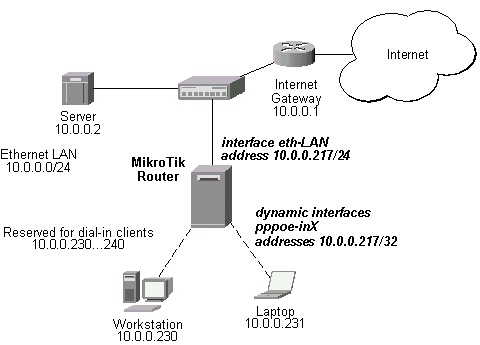
For example, you can assign IP addresses to dial-in (ppp, pppoe, pptp) clients
from the same address space as used on the connected LAN, of you enable the
proxy-arp on the LAN interface. Let us consider the following setup:
The MikroTik router setup is as follows:
[admin@MikroTik] ip arp> /interface ethernet print
Flags: X - disabled, R - running
  #    NAME                 MTU   MAC-ADDRESS       ARP
  0  R eth-LAN              1500  00:50:08:00:00:F5 proxy-arp
[admin@MikroTik] ip arp> /interface print
Flags: X - disabled, D - dynamic, R - running
  #    NAME                 TYPE             MTU
  0    eth-LAN              ether            1500
  1    prism1               prism            1500
  2 D  pppoe-in25           pppoe-in
  3 D  pppoe-in26           pppoe-in
[admin@MikroTik] ip arp> /ip address print
Flags: X - disabled, I - invalid, D - dynamic
  #   ADDRESS            NETWORK         BROADCAST       INTERFACE
  0   10.0.0.217/24      10.0.0.0        10.0.0.255      eth-LAN
  1 D 10.0.0.217/32      10.0.0.230      0.0.0.0         pppoe-in25
  2 D 10.0.0.217/32      10.0.0.231      0.0.0.0         pppoe-in26
[admin@MikroTik] ip arp> /ip route print
Flags: X - disabled, I - invalid, D - dynamic, J - rejected,
C - connect, S - static, R - rip, O - ospf, B - bgp
    #    DST-ADDRESS        G GATEWAY         DISTANCE INTERFACE
    0  S 0.0.0.0/0          r 10.0.0.1        1        eth-LAN
    1 DC 10.0.0.0/24        r 0.0.0.0         0        eth-LAN
    2 DC 10.0.0.230/32      r 0.0.0.0         0        pppoe-in25
    3 DC 10.0.0.231/32      r 0.0.0.0         0        pppoe-in26
[admin@MikroTik] ip arp>
The unnumbered interfaces can be used on serial point-to-point links, e.g., MOXA C101, Cyclades interfaces. A private address should be put on the interface with the "network" being the same as an address on the router on the other side of the p2p link (there may be no IP on that interface, but there is an ip for that router). For example:
[admin@MikroTik] ip address> add address=10.0.0.214/32 network=192.168.0.1 \
\... interface=pppsync
[admin@MikroTik] ip address> print
Flags: X - disabled, I - invalid, D - dynamic
  #   ADDRESS            NETWORK         BROADCAST       INTERFACE
  0   10.0.0.214/32      192.168.0.1     192.168.0.1     pppsync
[admin@MikroTik] ip address>
[admin@MikroTik] ip address> .. route print detail
Flags: X - disabled, I - invalid, D - dynamic, J - rejected,
C - connect, S - static, R - rip, O - ospf, B - bgp
    0  S dst-address=0.0.0.0/0 preferred-source=0.0.0.0 gateway=192.168.0.1
         gateway-state=reachable distance=1 interface=pppsync

    1 DC dst-address=192.168.0.1/32 preferred-source=10.0.0.214
         gateway=0.0.0.0 gateway-state=reachable distance=0 interface=pppsync

[admin@MikroTik] ip address>
Here, you can see, that a dynamic connected route has been automatically added to the routes list. If you want the default gateway be the other router of the p2p link, just add a static route for it. It is shown as #0 in the example above.