...Draft...
Document revision 14-Dec-2001
This document applies to the MikroTik RouterOS V2.4
The MikroTik RouterOS supports the following Cyclades PC300 Adapter hardware:
For more information about the Cyclades PCI Adapter hardware please see the relevant documentation:
The following topics are covered in this manual:
The MikroTik Router should have the cyclades software package installed. The software package file cyclades-2.4.y.npk can be downloaded from MikroTik’s web page www.mikrotik.com. To install the package, please upload the correct version file to the router and reboot. Use BINARY mode ftp transfer. After successful installation the package should be listed under the installed software packages list, for example:
[MikroTik] > system package print
  # NAME                   VERSION               BUILD-TIME           UNINSTALL
  0 routing                2.4.5                 dec/04/2001 14:54:29 no
  1 snmp                   2.4.5                 dec/04/2001 14:54:41 no
  2 ppp                    2.4.5                 dec/04/2001 14:55:36 no
  3 pppoe                  2.4.5                 dec/04/2001 14:56:30 no
  4 ssh                    2.4.5                 dec/04/2001 14:58:22 no
  5 pptp                   2.4.5                 dec/04/2001 14:55:54 no
  6 cyclades               2.4.5                 dec/04/2001 14:58:39 no
  7 framerelay             2.4.5                 dec/04/2001 15:07:21 no
  8 system                 2.4.5                 dec/04/2001 14:53:19 no
[MikroTik] >
The Cyclades PC300 PCI Adapter requires the Synchronous Feature License. One license is for one installation of the MikroTik RouterOS, disregarding how many cards are installed in one PC box. The Synchronous Feature is not included in the Free Demo or Basic Software License. The Synchronous Feature cannot be obtained for the Free Demo License. It can be obtained only together with the Basic Software License.
[MikroTik] > system resource irq print
 IRQ USED OWNER
 1   yes  keyboard
 2   yes  APIC
 3   yes  serial port
 4   yes  serial port
 5   no
 6   no
 7   no
 8   no
 9   yes  ether1
 10  no
 11  yes  [Cyclades-PC300]
 12  no
 13  yes  FPU
 14  yes  IDE 1
[MikroTik] > system resource io print
 PORT-RANGE            OWNER
 20-3F                 APIC
 40-5F                 timer
 60-6F                 keyboard
 80-8F                 DMA
 A0-BF                 APIC
 C0-DF                 DMA
 F0-FF                 FPU
 1F0-1F7               IDE 1
 2F8-2FF               serial port
 3C0-3DF               VGA
 3F6-3F6               IDE 1
 3F8-3FF               serial port
 EE00-EEFF             ether1
 EF80-EFFF             [Cyclades-PC300]
 FC00-FC07             IDE 1
 FC08-FC0F             IDE 2
 FC10-FC7F             [CS5530]
[MikroTik]
The basic installation steps of the PCI adapter should be as follows:
The Cyclades PC300 PCI Adapter should be recognized by your motherboard automatically and appear on the list of PCI devices as "Simple COMM Controller" with the IRQ assigned to it.
[MikroTik] > driver print
Flags: I - invalid, D - dynamic
  #   DRIVER                            IRQ IO         MEMORY     ISDN-PROTOCOL
  0 D Cyclades
  1 D RealTek RTL8129/8139
[MikroTik] >
There can be several reasons for a failure to load the driver, for example:
[MikroTik] > interface print
Flags: X - disabled, D - dynamic
  #   NAME                 MTU   TYPE
  0   ether1               1500  ether
  1 X cyclades1            1600  cyclades
[MikroTik] > interface
[MikroTik] interface> enable 1
[MikroTik] interface> print
Flags: X - disabled, D - dynamic
  #   NAME                 MTU   TYPE
  0   ether1               1500  ether
  1   cyclades1            1600  cyclades
[MikroTik] interface>
More configuration and statistics parameters can be found under the '/interface cyclades' menu. For the Cyclades PC300/RSV Synchronous PCI Adapter you should set the mtu to 1500, and have other argument values as below:
[MikroTik] interface cyclades> print
Flags: X - disabled
  0   name=cyclades1 mtu=1600 media-type=V35 line-code=none framing-mode=none
      line-build-out=0dB rx-sensitivity=none line-protocol=cisco-hdlc
      frame-relay-type=ansi frame-relay-dce=no speed=0 active-channels=0x0

[MikroTik] interface cyclades> set 0 mtu=1500
[MikroTik] interface cyclades> print
Flags: X - disabled
  0   name=cyclades1 mtu=1500 media-type=V35 line-code=none framing-mode=none
      line-build-out=0dB rx-sensitivity=none line-protocol=cisco-hdlc
      frame-relay-type=ansi frame-relay-dce=no speed=0 active-channels=0x0

[MikroTik] interface cyclades>
Argument description:
number - Interface number in the list
name - Interface name
mtu - Maximum Transmit Unit (68...1600 bytes). Deafault value is 1500 bytes.
media-type - The hardware media used for this interface (E1/RS232/T1/V35/X21)
line-code - For T1/E1 channels only. The line code (AMI/B8ZS/HDB3/NRZ/none)
framing-mode - For T1/E1 channels only. The frame mode (CRC4/D4/ESF/ESF-Japan/Non-CRC4/none/unframe)
line-build-out - For T1 channels only. Line Build Out Signal Level(0dB/15dB/22.5dB/7.5dB)
rx-sensitivity - For T1/E1 channels only. Receiver sensitivity (long-haul/none/short-haul)
line-protocol - Line Protocol (cisco-hdlc/sync-ppp)
speed - The clock mode or clock rate in bps. If '0', the external clock mode is selected. For V.35 should be set to '0' to use the external clock from the modem. Valeus greater than '0' represent the clock speed (which implies an internal clock).
active-channel - For T1/E1 channels only. The active 64Kb channels.
The Cyclades PC300/RSV Synchronous PCI Adapter comes with a V.35 cable. This cable should work for all standard modems, which have V.35 connections. For synchronous modems, which have a DB-25 connection, you should use a standard DB-25 cable.
Connect a communication device, e.g., a baseband modem, to the V.35 port and turn it on. The MikroTik driver for the Cyclades Synchronous PCI Adapter allows you to unplug the V.35 cable from one modem and plug it into another modem with a different clock speed, and you do not need to restart the interface or router.
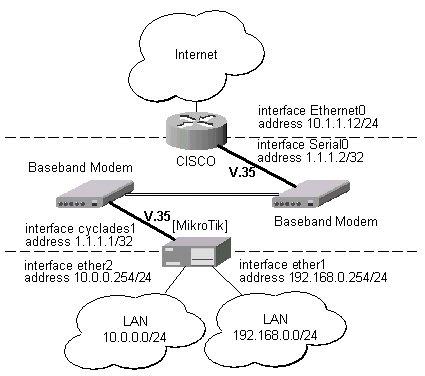
Let us consider the following network setup with MikroTik Router connected to a leased line with baseband modems and a CISCO router at the other end:
The driver for the Cyclades PC300/RSV Synchronous PCI Adapter should load automatically. The interface should be enabled according to the instructions given above. The IP addresses assigned to the cyclades interface should be as follows:
[MikroTik] ip address> add interface cyclades1 address 1.1.1.1/32 \
network 1.1.1.2 broadcast 255.255.255.255
[MikroTik] ip address> print
  # ADDRESS         NETMASK         NETWORK         BROADCAST       INTERFACE
  0 10.0.0.254      255.255.255.0   10.0.0.209      10.0.0.255      ether2
  1 1.1.1.1         255.255.255.255 1.1.1.2         255.255.255.255 cyclades1
  2 192.168.0.254   255.255.255.0   192.168.0.254   192.168.0.255   ether1
[MikroTik] ip address> /ping 1.1.1.2
1.1.1.2 pong: ttl=255 time=28 ms
1.1.1.2 pong: ttl=255 time=28 ms
1.1.1.2 pong: ttl=255 time=28 ms
ping interrupted
3 packets transmitted, 3 packets received, 0% packet loss
round-trip min/avg/max = 28/28.0/28 ms
interrupted
[MikroTik] ip address> /tool fping 1.1.1.2 size 1500 count 50
Sent: 1(2%) Received: 0(0%) min/avg/max RTT: 0/0/0 ms
Sent: 6(12%) Received: 5(83%) min/avg/max RTT: 212/212/212 ms
Sent: 11(22%) Received: 10(90%) min/avg/max RTT: 212/212/212 ms
Sent: 15(30%) Received: 14(93%) min/avg/max RTT: 212/212/212 ms
Sent: 20(40%) Received: 19(95%) min/avg/max RTT: 212/212/212 ms
Sent: 25(50%) Received: 24(96%) min/avg/max RTT: 212/212/213 ms
Sent: 30(60%) Received: 29(96%) min/avg/max RTT: 212/212/213 ms
Sent: 35(70%) Received: 34(97%) min/avg/max RTT: 212/212/213 ms
Sent: 39(78%) Received: 38(97%) min/avg/max RTT: 212/212/213 ms
Sent: 44(88%) Received: 43(97%) min/avg/max RTT: 212/212/214 ms
Sent: 49(98%) Received: 48(97%) min/avg/max RTT: 212/212/214 ms
Sent: 50(100%) Received: 50(100%) min/avg/max RTT: 212/212/214 ms
[MikroTik] ip address>
Note, that for the point-to-point link the network mask is set to 32 bits, the argument 'network' is set to the IP address of the other end, and the broadcast address is set to 255.255.255.255. The default route should be set to the gateway router 1.1.1.2:
[MikroTik] ip route> add gateway 1.1.1.2 interface cyclades1
[MikroTik] ip route> print
  # DST-ADDRESS     NETMASK         GATEWAY         PREF-ADDRESS    INTE...
  0 10.0.0.0        255.255.255.0   0.0.0.0         10.0.0.254      ether2  D K
  1 192.168.0.0     255.255.255.0   0.0.0.0         192.168.0.254   ether1  D K
  2 1.1.1.2         255.255.255.255 0.0.0.0         1.1.1.1         cyc...  D K
  3 0.0.0.0         0.0.0.0         1.1.1.2         0.0.0.0         cyc...
[MikroTik] ip route>
The configuration of the CISCO router at the other end (part of the configuration) is:
CISCO#show running-config
Building configuration...

Current configuration:
...
!
interface Ethernet0
 description connected to EthernetLAN
 ip address 10.1.1.12 255.255.255.0
!
interface Serial0
 description connected to MikroTik
 ip address 1.1.1.2 255.255.255.252
 serial restart-delay 1
!
ip classless
ip route 0.0.0.0 0.0.0.0 10.1.1.254
!
...
end

CISCO#
Send ping packets to the MikroTik router:
CISCO#ping 1.1.1.1

Type escape sequence to abort.
Sending 5, 100-byte ICMP Echos to 1.1.1.1, timeout is 2 seconds:
!!!!!
Success rate is 100 percent (5/5), round-trip min/avg/max = 28/32/40 ms
CISCO#